Meet The Author

I'm Aritra Sarkar, An Engineer,currently living in Kolkata, West Bengal, India.You can also find me in HindiDost

Showing posts with label email to pdf. Show all posts

Monday, 30 October 2017

Home PagePrint Story

These Three Websites Will help You For Your PDF Conversion

Recently I was searching for methods to convert my documents to pdf and came across some of the very good websites which I think will be helpful to you too. So here I am listing some of the websites for doing the same.
These websites not only change word to pdf or vice versa but also can do a lot of other tasks which someday you may find it helpful.


1. Cloudconvert: CloudConvert offers one of the most advanced PDF to Word conversions!

2. Smallpdf: Simple software solutions and affordable. Free to use twice per hour.

3. Pdfconvert.me:  Send an email and convert to PDF. I have an old blog post for it.

Also, check out: Useful websites


These are my picks for all your pdf needs. Apart from that if you have any other ideas or websites or suggestion please do comments.


Sighning off

Aritra 
Monday, 9 February 2015

Home PagePrint Story

Converting attached files in Gmail to pdf using Google Scripts and Docs- Labnol.org help

In last post titled Convert files to PDF-www.pdfconvert.me   we get the email attachments converted to pdf by sending an email to attachconvert@pdfconvert.me  . Suppose instead of sending an email to your very own gmail id. 
For eg. your email Id is xyz@gmail.com and you send your mail to xyz+pdf@gmail.com to convert the attached file to pdf. One advantage of using this is that you don't have to remember that email ID of pdfconvert.me 

Requirements: Google ID
Considering email ID as xyz@gmail.com

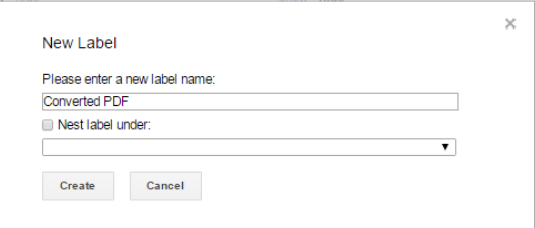
Step1: Create a New Label named as "Converted PDF"

New Label- Converted PDF
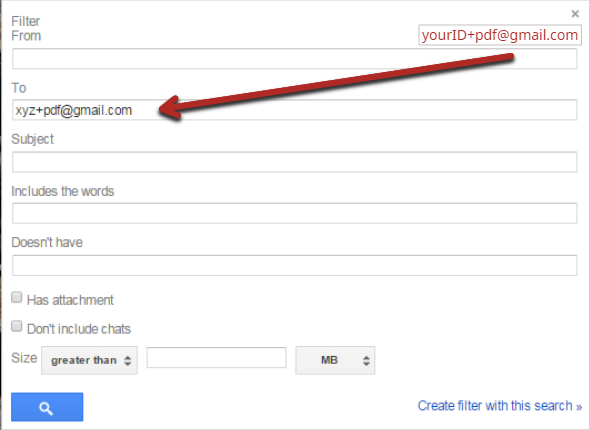
Step2: Create a new filter with xyz+pdf@gmail.com

Creating Filter

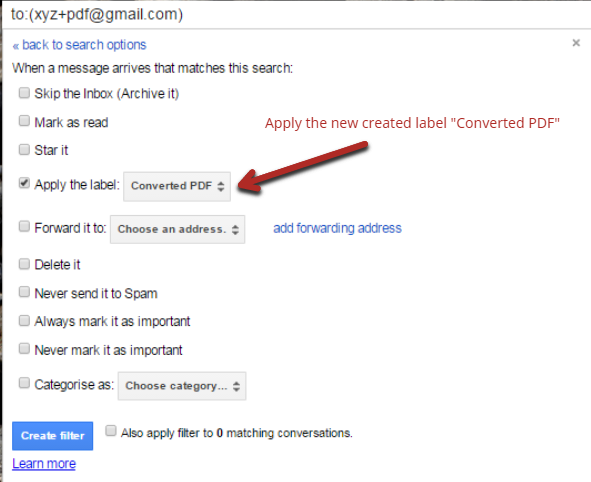
Step3: Apply the new label "Converted PDF" to the new filter.

Created Filter with new label applied

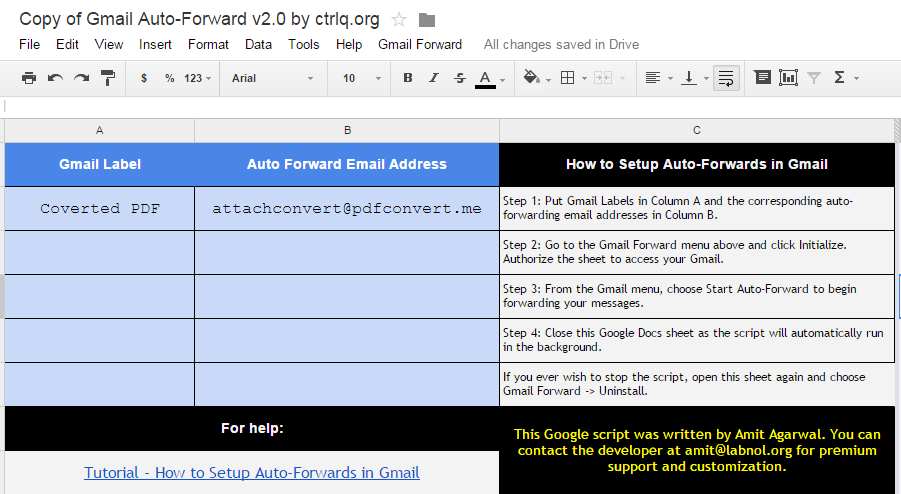
Step4: Make a new copy of this google spreadsheet by labnol.org in your Google Sheets and type as shown in pic. After that Setup Auto-Forwards as described step wise in sheet.
Google Sheet


Step5: Setup complete . So whenever you send an email with attachment to "youruserID+pdf@gmail.com" (here UserID assumed as "xyz") you will get a mail from pdfconvert@pdfconvert.me with your attachment converted to pdf.


Sunday, 8 February 2015

Home PagePrint Story

Convert files to PDF-www.pdfconvert.me

pdfconvert.me icon


pdfconvert.me is a free email service which will take the content of a message and return that content back to the sending email as a PDF attachment. This allows mobile devices to have a "print to PDF" feature in many circumstances.
Eg. To convert a supported file format to PDF, simply email the file as an attachment to attachconvert@pdfconvert.me . and within few seconds you will have the converted pdf file in your mail box

Web Page to pdf : webconvert@pdfconvert.me
Body of an email to pdf formatpdfconvert@pdfconvert.me
Attached Docs in email to pdf : attachconvert@pdfconvert.me
Without emailer headers at the top of the resulting PDF : noheaders@pdfconvert.me

Have your comments please.