In last post titled Convert files to PDF-www.pdfconvert.me we get the email attachments converted to pdf by sending an email to attachconvert@pdfconvert.me . Suppose instead of sending an email to your very own gmail id.
For eg. your email Id is xyz@gmail.com and you send your mail to xyz+pdf@gmail.com to convert the attached file to pdf. One advantage of using this is that you don't have to remember that email ID of pdfconvert.me
Requirements: Google ID
Considering email ID as xyz@gmail.com
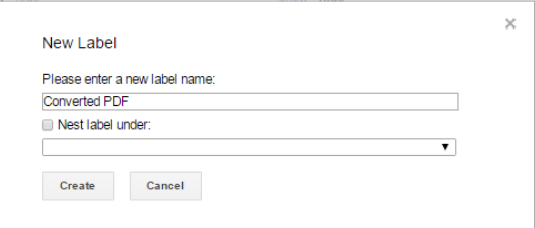
Step1: Create a New Label named as "Converted PDF"
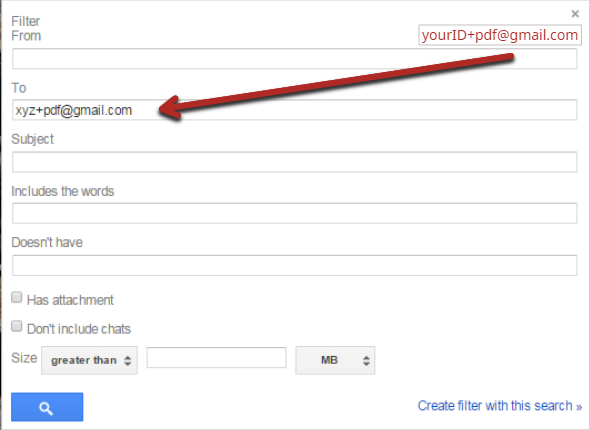
Step2: Create a new filter with xyz+pdf@gmail.com
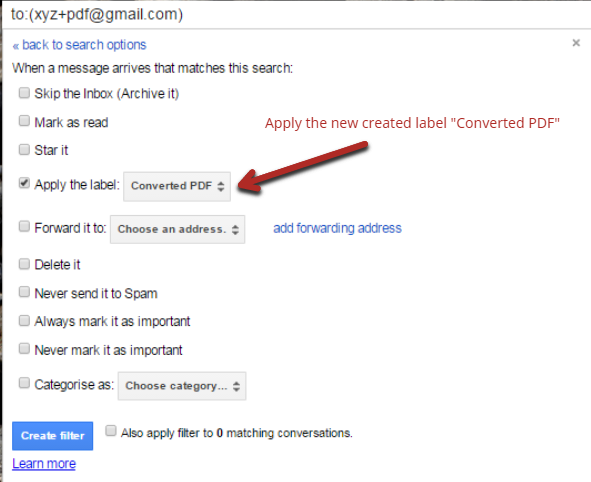
Step3: Apply the new label "Converted PDF" to the new filter.
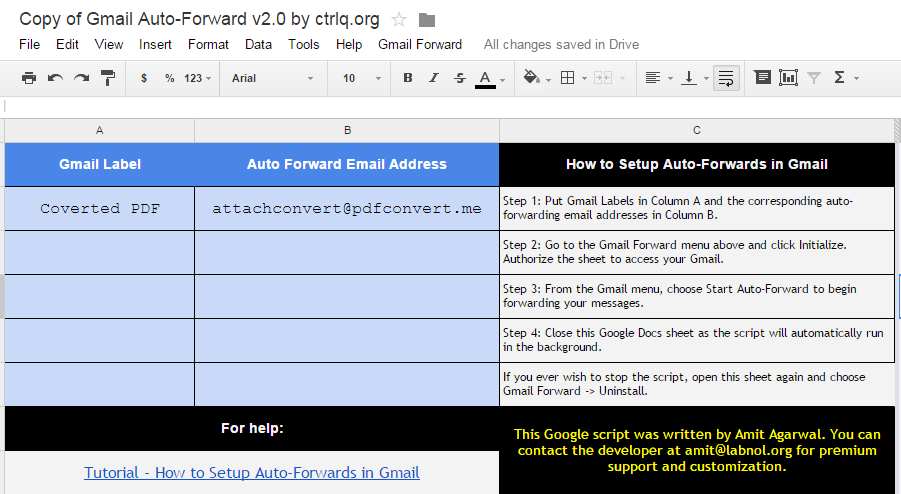
Step4: Make a new copy of this google spreadsheet by labnol.org in your Google Sheets and type as shown in pic. After that Setup Auto-Forwards as described step wise in sheet.
Step5: Setup complete . So whenever you send an email with attachment to "youruserID+pdf@gmail.com" (here UserID assumed as "xyz") you will get a mail from pdfconvert@pdfconvert.me with your attachment converted to pdf.


