Meet The Author

I'm Aritra Sarkar, An Engineer,currently living in Kolkata, West Bengal, India.You can also find me in HindiDost

Showing posts with label photo editing. Show all posts

Monday, 6 July 2015

Home PagePrint Story

Snaggy lets you to copy paste images online

snag.gy

What is snaggy?
Snaggy is an image host that lets you paste images from your clipboard directly online.  Any kind of image, from raw data to URL paths, can be pasted in one step. Snaggy also has a simple built-in editor you can use before you share your image. 


Why was it made?
Sharing screenshots has always been a big hassle: you have to press print-screen, then paste it into an image editor, then save the image to your local hard drive, then browse for it and upload it.  This was always an annoyance, so snaggy was made to simplify the process into a single step.  Since then it has saved a lot of time, so made it public so that everyone can benefit from it. 


What is it used for?
Here are some suggested ways to use snaggy:
Show a friend a work-in-progress drawing.  Copy a selection in the program you are drawing in, and then paste it to snaggy.
Are you trying to troubleshoot a computer problem?  Copy any error message windows by clicking on them and pressing alt + print-screen.  Paste the result to snaggy to show others the exact message.
Found a hilarious or stupid comment on Youtube or Facebook? Share it with your friends by pressing print screen, pasting it in snaggy, and then using snaggy's editor to crop the comment, make annotations, and to cross out people's names.
FTFY: if you want to edit a new copy of an image you see on snaggy, just click the "remix this image" link at the top and edit your own version.
Friday, 19 June 2015

Home PagePrint Story

Amazingly simple graphic design- Canva.com


Canva
Flickr:thewikiman


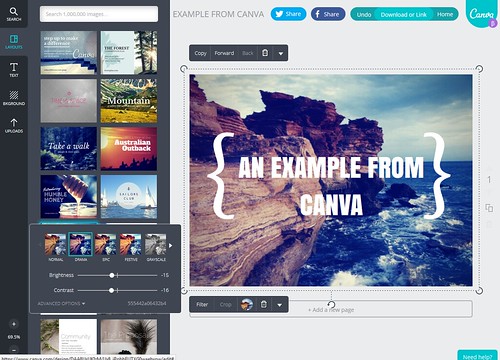
Canva gives you everything you need to easily turn ideas into stunning designs. Create designs for Web or print: blog graphics, presentations, Facebook covers, flyers, posters, invitations and so much more.


Search and drag to create beautiful designs without ever leaving the Web. Canva takes care of the boring bits so you can spend more time creating. Start with a custom layout or a blank page. With all the tools in one place, there's nothing holding you back.


Simply search for the best graphics, photos, and fonts, or upload your own, then use Canva’s drag and drop tool to create a design. Design with hundreds of free elements and fonts, or choose from our library of more than 1 million premium images for $1.